
Locked clinic network
잠긴 클리닉 네트워크
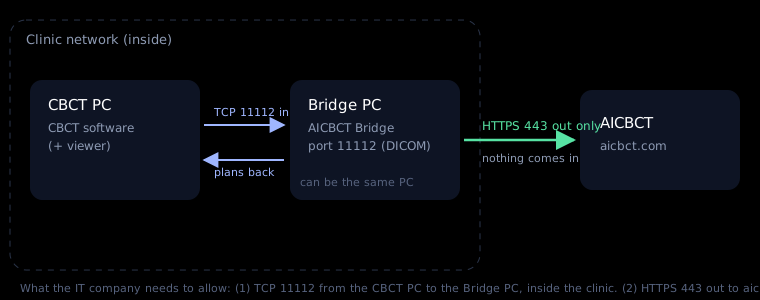
Many clinic networks are locked by an IT company. That is good for security — the Bridge needs only two small openings, and nothing from the internet comes in.
많은 클리닉 네트워크는 IT 업체가 잠가 둡니다. 보안에 좋은 일입니다. Bridge는 작은 통로 두 개만 필요하고, 인터넷에서 들어오는 연결은 없습니다.
The image server is locked
영상 서버가 잠겨 있음
The Bridge does not go on the CT image server. Put it on any other Windows PC on the same network — the front desk or office PC. The CBCT software sends to it like to one more PACS; the server stays untouched.
Bridge는 CT 영상 서버에 깔지 않습니다. 같은 네트워크의 다른 윈도우 PC(접수나 사무실 PC)에 설치하세요. CBCT 소프트웨어는 PACS를 하나 더 추가하듯 그쪽으로 보내고, 서버는 건드리지 않습니다.
No administrator rights on the PC
PC에 관리자 권한이 없음
The Bridge still runs for your user. For the one "Yes", ask the PC administrator or IT company — send the e-mail with the signed authorization.
Bridge는 사용자 권한으로도 돌아갑니다. "예" 한 번은 PC 관리자나 IT 업체에 부탁하세요. 서명된 허가서를 붙인 이메일을 보내면 됩니다.
The download or the program is blocked
다운로드나 프로그램이 차단됨
App control or antivirus needs an exception for AICBCT-Bridge-Setup.exe.
앱 제어나 백신에 AICBCT-Bridge-Setup.exe 예외가 필요합니다.
Cannot reach AICBCT
AICBCT에 접속 안 됨
Outgoing HTTPS (443) to aicbct.com must be open. A proxy is used automatically if Windows has one set.
aicbct.com으로 나가는 HTTPS(443)가 열려 있어야 합니다. 윈도우에 프록시가 설정돼 있으면 자동으로 씁니다.
The CBCT cannot reach the Bridge
CBCT가 Bridge에 닿지 않음
Inside the clinic, TCP 11112 from the CBCT PC to the Bridge PC must be open (firewall, separate network segments / VLAN).
클리닉 안에서 CBCT PC → Bridge PC로 TCP 11112가 열려 있어야 합니다(방화벽, 분리된 네트워크/VLAN).
The PC sleeps or is shut down at night
PC가 잠자기 또는 밤에 꺼짐
Fine — the Bridge catches up when the PC is on. Keep it awake during clinic hours.
괜찮습니다. PC가 켜지면 Bridge가 밀린 일을 처리합니다. 진료 시간에는 깨어 있게 해 주세요.
The setup page writes the request for you: open An IT company manages your clinic network? Send this to them, copy it, save the signed authorization (PDF), and e-mail both. The PDF is the clinic owner's own signed permission from the CBCT registration — IT companies usually ask for exactly that.
설정 화면이 요청문을 써 줍니다. An IT company manages your clinic network? Send this to them을 열어 복사하고, 서명된 허가서(PDF)를 저장해 함께 이메일로 보내세요. 이 PDF는 CBCT 등록 때 클리닉 대표가 직접 서명한 허가서입니다. IT 업체가 보통 바로 그것을 요구합니다.
For the IT company
| Direction | From → to | Port | Why |
|---|---|---|---|
| Inside LAN | CBCT PC → Bridge PC | TCP 11112 | DICOM Modality Worklist (C-FIND), Storage (C-STORE), Echo |
| Inside LAN | Bridge PC → viewer | viewer's DICOM port | Treatment plans as DICOM Encapsulated PDF (optional) |
| Outbound | Bridge PC → aicbct.com, *.amazonaws.com | TCP 443 | HTTPS polling and encrypted upload (S3, presigned) |
| Inbound from internet | — | none | Not needed |
Local setup page: http://127.0.0.1:8417 (this PC only). Data folder: C:\ProgramData\AICBCT Bridge. Starts with Windows via the user Startup folder. Only studies whose Accession Number is an AICBCT request number are uploaded.