
Your CBCT software
CBCT 소프트웨어 설정
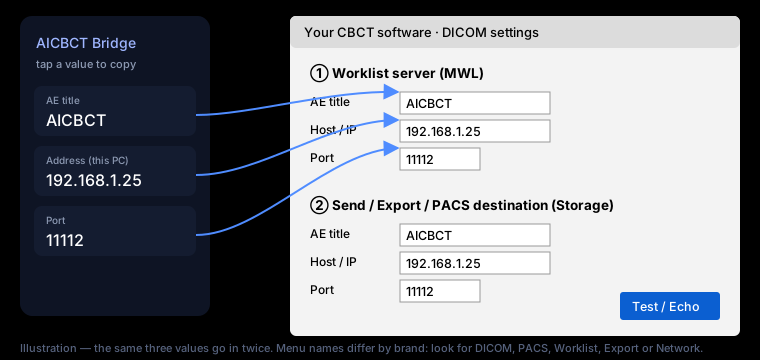
Planmeca Romexis
Look in: Admin / Configuration → DICOM
찾을 곳: Admin / Configuration → DICOM
Romexis DICOM features can be a licensed option.
Romexis의 DICOM 기능은 유료 옵션일 수 있습니다.
Carestream / CS Imaging
Look in: DICOM or PACS settings of CS Imaging / the 3D acquisition
찾을 곳: DICOM or PACS settings of CS Imaging / the 3D acquisition
Worklist may need the DICOM option from your dealer.
워크리스트는 대리점의 DICOM 옵션이 필요할 수 있습니다.
Vatech EzDent-i
Look in: Setup → DICOM, or the separate DICOM configuration tool
찾을 곳: Setup → DICOM, or the separate DICOM configuration tool
Worklist and send may need activation by your dealer.
워크리스트와 전송은 대리점이 활성화해야 할 수 있습니다.
Dentsply Sirona Sidexis
Look in: DICOM / network settings
찾을 곳: DICOM / network settings
Sidexis may need the DICOM licence.
Sidexis는 DICOM 라이선스가 필요할 수 있습니다.
Owandy QuickVision
Look in: DICOM settings
찾을 곳: DICOM settings
Ask your dealer if DICOM send is not shown.
DICOM 전송이 안 보이면 대리점에 문의하세요.
Other CBCT software
Look in: Look for DICOM, PACS, Worklist, MWL, Export, Send or Network
찾을 곳: Look for DICOM, PACS, Worklist, MWL, Export, Send or Network
If there is no DICOM section, ask the maker for "DICOM Worklist and DICOM Send".
DICOM 항목이 없으면 제조사에 "DICOM Worklist와 DICOM Send"를 요청하세요.
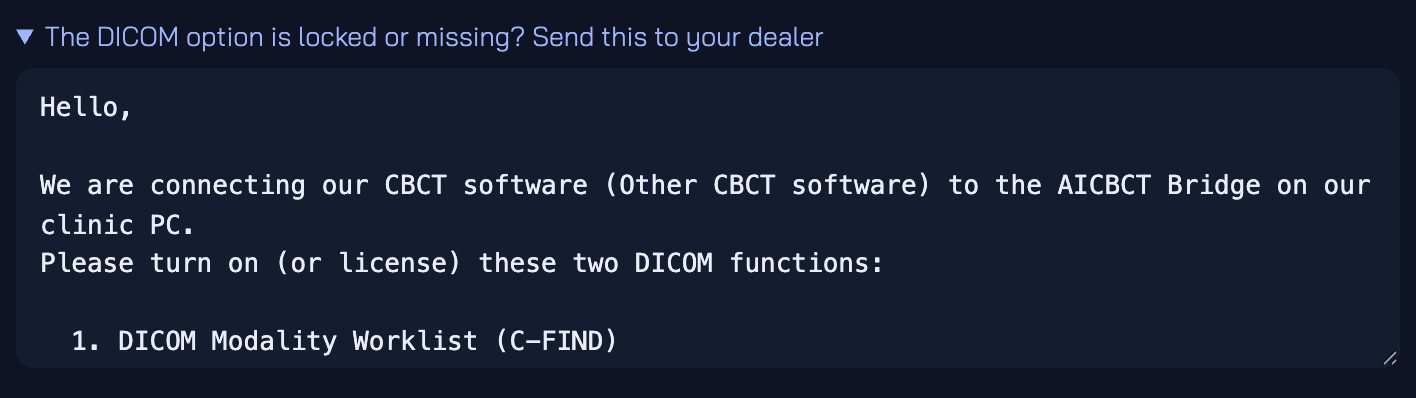
DICOM option locked or missing? The Bridge writes the request to your dealer for you — open Send this to your dealer on the setup page and copy it into an e-mail.
DICOM 옵션이 잠겨 있거나 없나요? Bridge가 대리점에 보낼 요청문을 써 줍니다. 설정 화면의 Send this to your dealer를 열어 이메일에 붙여 넣으세요.
Menus change between versions. We add pictures from real clinics for each brand as they connect.
메뉴 위치는 버전마다 다릅니다. 각 브랜드가 실제 클리닉에서 연결될 때마다 사진을 더하겠습니다.